Preview

One date drives
the whole workbook

Enter your go-live date, and the communication plan, go-live check and KPI tracker calculate their own deadlines. A reporting date defines what counts as overdue and which status the management summary shows. The images show the included example project.

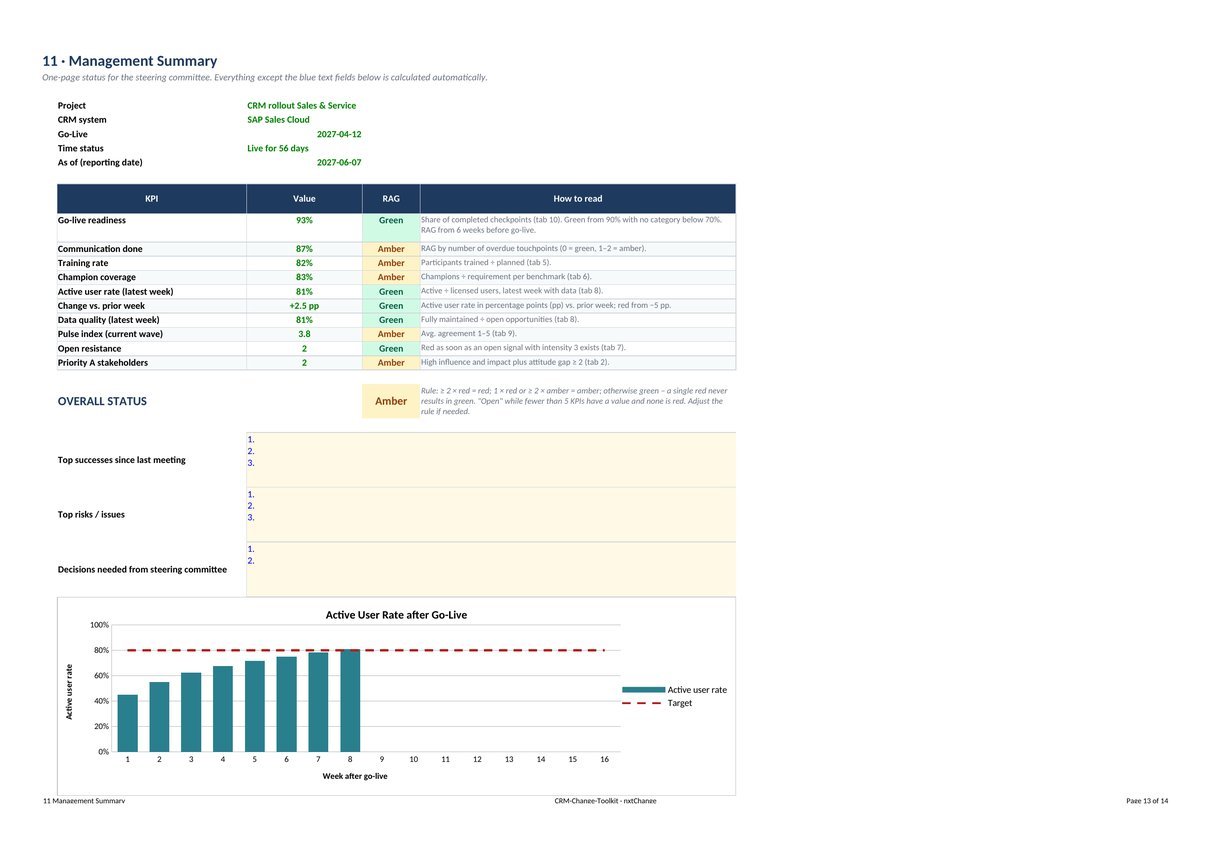
Tab 11 · Management summary: ten KPIs with traffic lights and overall status, print-ready on one page.
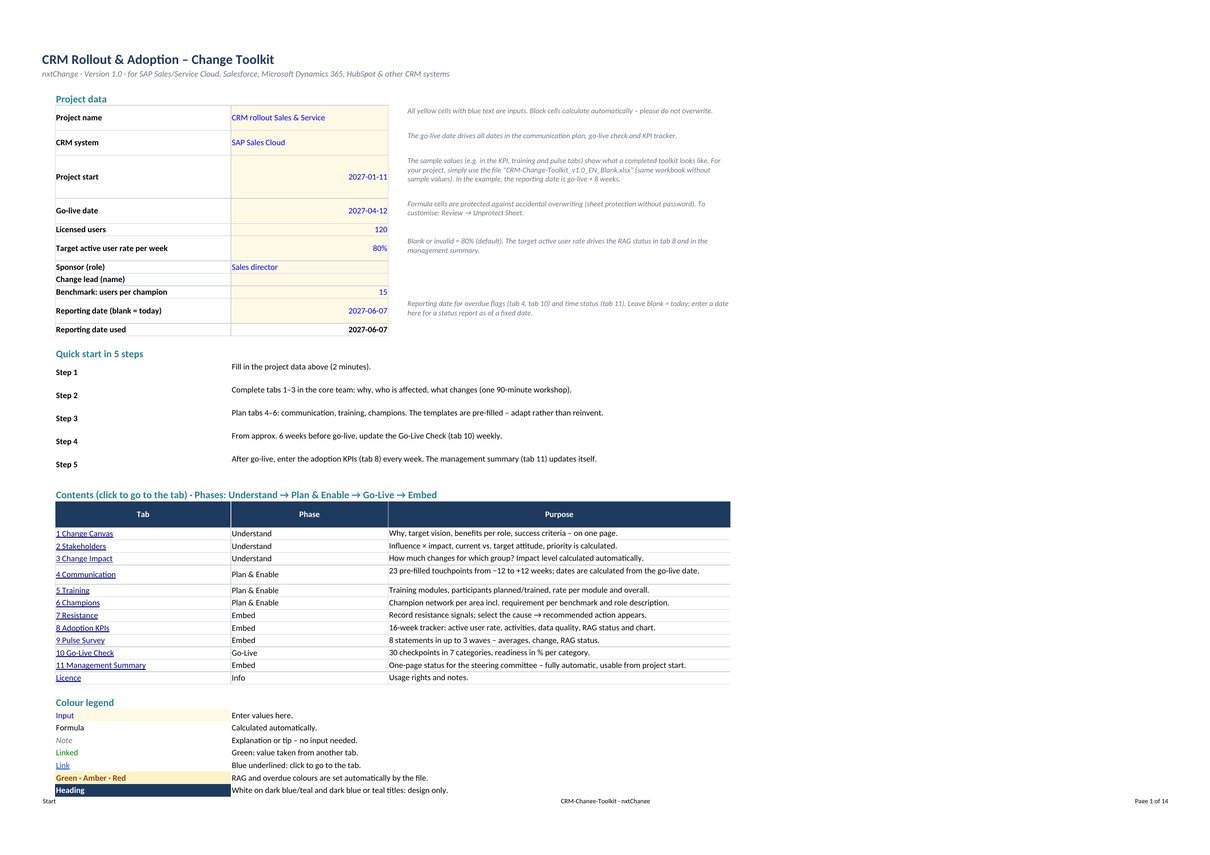
Start tab: project data, go-live date and reporting date, quick start in five steps.
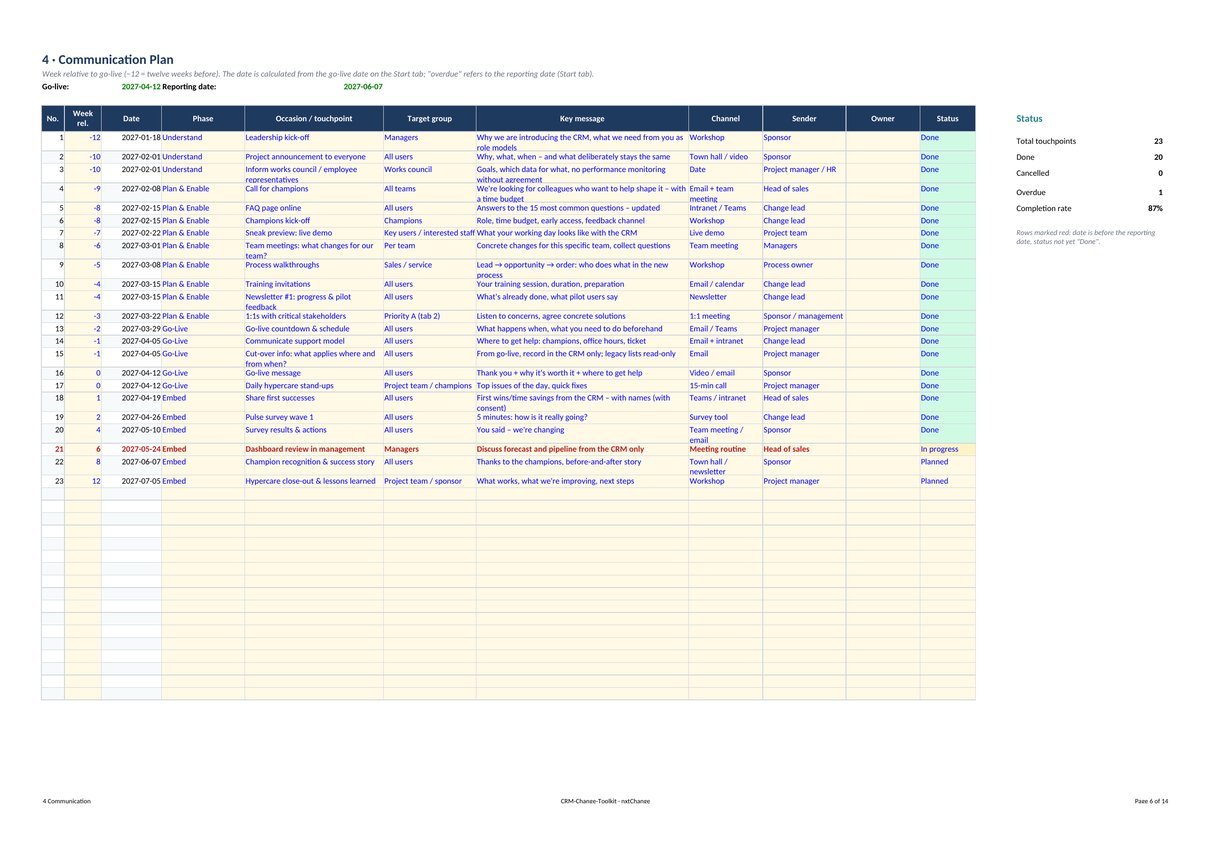
Tab 4 · Communication plan: dates are calculated from the go-live date; overdue items are highlighted.
Why

Why CRM projects
really fail

Rarely because of technology. Most CRM projects make it to go-live, but then contacts stay in Outlook, the pipeline stays in a spreadsheet, and visit reports are entered late or not at all. Behind this are the same six patterns, and the toolkit has a building block for each.

No “why”

“It's a control tool for management.”

Change canvas and communication plan: purpose and target picture on one page, every message from the right sender.

No personal benefit

“For me it's just extra work.”

Benefits per role in the canvas and the impact analysis: how much changes for which group.

Leaders don't role-model it

The forecast is still discussed from Excel.

Stakeholder analysis with calculated priority and a go-live check that includes leadership tasks.

Parallel worlds

Old lists stay active, everything is maintained twice.

Switch-off date in the go-live check and a resistance tracker that suggests an action for each cause.

One-size-fits-all training

One day of training, three weeks before go-live.

Role-based training plan with completion rate per module and a champion network per department.

Nobody measures usage

Success means: “The system is running.”

Adoption KPIs over 16 weeks and a pulse survey in three waves after go-live.

Approach

Four phases
around go-live

From twelve weeks before to twelve weeks after: the workbook follows an approach the guide explains chapter by chapter. Shorter projects compress the phases but skip none.

01
12 to 10 weeks before go-live

Understand

Why, who, what changes: a shared picture in the core team.

Canvas, stakeholders, change impact

02
9 to 3 weeks before go-live

Plan & Enable

Plan communication, training and champions so every role is prepared.

Communication, training, champions

03
Check from 6 weeks before go-live

Go-Live

Check readiness and base the go/no-go decision on facts.

Go-live check

04
Go-live to 12 weeks after

Embed

Measure usage, resolve resistance, make early wins visible.

Resistance, adoption KPIs, pulse, summary

Contents

Twelve tabs,
linked together

Communication plan, training modules, go-live checklist and actions against resistance come pre-filled. You adapt instead of reinventing.

  • Start

    Project data and quick start

    Starting point

    Project name, CRM system, go-live date, number of users and reporting date. Plus a five-step quick start and a clickable table of contents.

  • Tab 1

    Change canvas

    Understand

    Purpose, target picture, benefits per role and success criteria on one page. The elevator pitch becomes the first line of every project message.

  • Tab 2

    Stakeholder analysis

    Understand

    Influence and impact, current and target attitude. Quadrant and priority are calculated; the map shows the distribution.

  • Tab 3

    Change impact

    Understand

    Five dimensions per group: processes, systems, role, behaviour, KPIs. The impact level is calculated automatically.

  • Tab 4

    Communication plan

    Plan & Enable

    23 pre-filled touchpoints from twelve weeks before to twelve weeks after go-live. If go-live moves, the whole plan moves.

  • Tab 5

    Training plan

    Plan & Enable

    Role-based modules instead of one standard training, participants planned and trained, rate per module and overall.

  • Tab 6

    Champions

    Plan & Enable

    Champion network per department with a rule-of-thumb headcount and a role description you can use directly.

  • Tab 7

    Resistance tracker

    Embed

    Record signals verbatim, pick the cause, and the matching action appears.

  • Tab 8

    Adoption KPIs

    Embed

    Four numbers per week for 16 weeks: active rate, activities, data quality, traffic light and chart against your target.

  • Tab 9

    Pulse survey

    Embed

    Eight statements in three waves after go-live, easy to copy into MS Forms or Google Forms. Change and traffic light are calculated.

  • Tab 10

    Go-live check

    Go-Live

    30 check items in seven categories, readiness per category and a clear rule for the go recommendation.

  • Tab 11

    Management summary

    Embed

    One-page status for the steering committee: ten KPIs with traffic lights and overall status, fully automatic and printed on one page.

In the package

Two workbooks and a guide

  • Blank workbook (Excel): pre-filled templates, no project data and no example values
  • Example project (Excel): the same workbook, filled in for a fictitious project
  • 12-page guide as PDF for reading and printing and as Word file for editing
  • No macros, no external links; formulas protected against accidental overwriting (no password)
In the guide

Approach, email templates and agenda

  • The four-phase approach and every tab step by step
  • KPI definitions: measure adoption without monitoring individuals
  • Five email templates: announcement, call for champions, countdown, go-live message, first wins
  • A 30-minute steering committee agenda
  • The first 90 days after go-live and the most common mistakes
Licences

On your own
or as a team

Both licences include the same package. They differ only in how many people work with it. All files are in English; a German edition is also available: German edition.

Single licence

For one person

$119

For your own projects and for projects for your employer or clients. Completed files may be shared within the respective project.

  • All version 1.0 files as an instant download
  • Free updates within version 1.x
  • Questions by email, directly to me
Buy single licence – $119
Team licence

For up to 10 people in the same organisation

$349

For project and change teams in which several people work with the template.

  • All version 1.0 files as an instant download
  • Free updates within version 1.x
  • Questions by email, directly to me
Buy team licence – $349

One-time payment in US dollars. Checkout, receipt and download are handled by Payhip; choose the licence (single or team) on the checkout page, where you also see the final price including any applicable VAT or sales tax. Not permitted: reselling or publicly distributing the blank template, including modified versions or as part of another product. The toolkit supports planning and steering but does not replace project, legal or labour-law advice. All example values are fictitious.

SAP, Salesforce, Microsoft (including Dynamics 365 and Excel), HubSpot, Pipedrive and Zoho are trademarks of their respective owners. They are named only to describe compatibility; there is no affiliation with these companies.

FAQ

Questions about the toolkit

Who is the toolkit for?

For anyone responsible for a CRM rollout: project managers, change leads, sales and service leaders, IT/CRM owners in mid-sized companies, and consultants supporting CRM implementations for clients.

Does it work with our CRM system?

Yes. The templates are system-agnostic and work for SAP Sales and Service Cloud, Salesforce, Microsoft Dynamics 365, HubSpot, Pipedrive, Zoho and others. No connection to your CRM is needed: you enter four numbers per week, and the guide names the typical data source for each KPI.

What software do I need?

Microsoft Excel 2016 or later (Windows or Mac), Excel for the web, or LibreOffice Calc. Google Sheets can import the workbook, but charts and colour rules may differ. The workbook contains no macros and no external links.

Is everything in English?

Yes. Workbook tabs, dropdowns, instructions, charts, the guide and the README are in English. Dates use the ISO format YYYY-MM-DD.

Single or team licence: which do I need?

The single licence covers one person, including projects for your employer or clients; completed files may be shared within the respective project. The team licence covers up to ten people in the same organisation. For both: the blank template may not be resold or publicly distributed.

How do I get the files?

Right after checkout on Payhip you get a download link on the confirmation page and by email. Please save the files locally.

Do I get updates?

Yes. Updates within version 1.x are free. A short email with your order number to karl.maier@nxtchange-consulting.com is enough.

Can I customise it?

Yes. Sheet protection has no password (Review → Unprotect Sheet).

Prefer guidance?

Let's take a step
in the right direction

The toolkit gives you the structure. If you want someone at your side to fill it with your team, I support CRM rollouts as a change manager, in German or English.